Sports stats capture for tournament roles
Impact
Digital stats
Less manual work for organizers
Impact
5,600+
Athletes across 570 teams
Impact
16,000
Fans followed the tournament
- Brackets App
- Sports
- Co-founder and Designer
- ~8 weeks
(Who and why?)
Context
01
The situation
Brackets is a web and mobile platform for sports tournament management. Administrators use the web tool to manage categories, teams, schedules, and results. Athletes follow game dates, results, standings, and live stats on the mobile app.
Before this project, tournament stats lived entirely on paper. Scorekeepers filled out sheets by hand, then handed them to admins after each match. Admins retyped the results into a spreadsheet and shared them over WhatsApp. With multiple tables and matches running at once, this chain needed several people and took real time to get results out.
It also meant no one outside that chain could see anything live. Family, friends, coaches, and other teams had no way to follow a match while it was happening. The only stats anyone saw were the ones that made it through paper, then Excel, then WhatsApp, usually well after the match ended.
02
My role & approach
Humberto, my co-founder, and I landed on a dedicated Scorekeeper role instead of stretching Admin to cover it, and I pushed to keep the two clearly separate. Stakeholder interviews showed each match table has its own team: scorekeeper, timekeeper, narrator. The head referee could work as a regular Admin. The scorekeeper could not. Multiple tables running at once meant giving every scorekeeper Admin access would break both the permission model and the UI.
Humberto and I cut scope down to one feature: live stats capture. We did not have time to build the full role. Live capture was the one thing tournament admins needed to see Brackets as viable, so everything else about the role could wait.
(What I did)
Process & solution
03
The work
The first version of the stats capture screen was built for admins, not scorekeepers. Stats were input fields: type a number, save it. That worked fine for someone entering results after the fact, but not for someone sitting courtside, capturing every point, foul, rebound, steal, and block as it happened. There was no way to increase or decrease a stat in the moment, matching the actual pace of the game.
I redesigned the flow around four things a scorekeeper actually needed:
- Recording a basket (1, 2, or 3 points) in the fewest clicks or taps possible
- Logging fouls per player without leaving the main capture screen
- Correcting a mistake on the spot, without interrupting the live flow
- Showing the live score for both teams, so the scorekeeper could self-check against what they were seeing on the court
04
Validating and Iterating
We tested the flow live, with real scorekeepers at the table, over two days at ANUIES 2026 (32+ teams).
Day 1 surfaced two problems. Scorekeepers couldn't find their assigned game without help. Fast sequences caused a few missed plays. Together, these led to 4 discrepancies between the paper backup and Brackets, out of every point and stat captured live. Each one was easy to fix. An admin just corrected it directly in Brackets.
By Day 2, the friction was gone. Scorekeepers moved through the flow with no questions and no negative feedback.
At the end of the tournament, scorekeepers gave us feedback directly. One called it "very user-friendly." Another said "I picked it up right away."
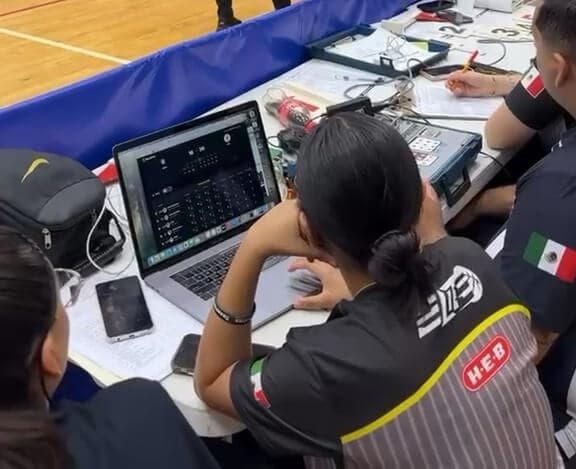
After ANUIES, we redefined the role based on what Day 1 taught us. The navigation friction was the clearest, most fixable signal. Scorekeepers didn't need more training, they needed a shorter path to their game.
We limited the scorekeeper's access. A scorekeeper can now:
- Only see and capture the games assigned to them
- Only start a game at the correct date and time
- Not edit a finished game (that stays admin-only)
- Not access any tournament administration functions
Admins can also assign each scorekeeper to a specific court, so they only see their games for that day. Our hypothesis: this keeps tournament data safe, and gives administrators confidence in the new role.
I designed a dedicated scorekeeper home screen that shows only their assigned games right after login. No searching, no admin menus, no need for guidance.
Brackets worked. Admins, athletes, and coaches followed the tournament live for the first time. It replaced a chain of paper, Excel, and WhatsApp with something scorekeepers could run themselves, and something everyone else could actually watch.
After ANUIES, we regrouped as a team to talk through what worked and what still needed fixing, for admins, scorekeepers, and athletes alike.
05
A harder constraint: designing for Elite
A few weeks later, we started talking with the administrator for the next tournament, Elite. Elite is a different environment: around 570 teams, 14 categories, and a venue with limited connectivity. Live capture couldn't depend on a stable connection, so we designed an offline version: the Digital Sheet. The scorekeeper captures the game offline, and once a connection is available, it syncs and becomes visible to everyone.
Key decisions behind it:
- Data saves locally during capture, so closing the tab or a device shutting down doesn't lose the game
- The scorekeeper can exit and return mid-game, resuming exactly where they left off
- The system confirms a successful sync, so the scorekeeper knows the data reached the server
- Once synced, the result looks identical to a live-captured game, so athletes and fans get the same experience either way
Elite was close to ANUIES, but not identical. Matches run in two halves instead of four quarters, and the scorekeeper works alone at the table, without a timekeeper or narrator. That meant a few things needed to be more explicit than before:
- Local vs. visitor colors: I defined which team was local and which was visitor, then set uniform colors in the app, black for local, red for visitor, so a solo scorekeeper could tell teams apart at a glance.
- Sticky footer: I moved match info, the score, and the finalize/publish actions into a fixed footer, so the scorekeeper always had what mattered most without losing screen space to scrolling.
This flow is what makes Brackets usable at Elite's scale, where the venue's limits would otherwise block live capture entirely.
(Final thoughts)
Reflections
06
Final thoughts
Elite ran in July 2026, the real test for the Digital Sheet: real scorekeepers, in a venue with limited connectivity. The scale was the biggest the product had handled:
- 5,600+ athletes across 570 teams
- 14 categories, 5 days of competition
- 16,000 unique visitors
Alongside the scorekeeper, we shipped visual improvements to the athlete app across web, iOS, and Android. That work landed well and made the experience more consistent for athletes checking stats and schedules.
Elite also surfaced problems the scorekeeper tool alone couldn't solve:
- Game schedules arrived with little notice and some inconsistencies
- Playoffs brought scheduling conflicts across categories
- Some courts still had no device, so stats were captured on paper, incomplete sheets that meant rework later
Most of what went wrong was operational, not the Digital Sheet itself. We stayed close to the administrators and helped them recover in real time so the experience held up for athletes and fans.
Adding the scorekeeper was never just a feature. It's the piece that makes the rest of the product work. Brackets means designing for people on both sides of the game: less manual work for administrators, real stats and recognition for athletes, and a live game to follow for family and friends.
Other case studies
Consolidating five behavioral therapy tools
Designed and tested a unified solution to streamline workflows and reduce fragmentation in behavioral health.
View case study →
Membership application redesign for physicians
Redesigned and improve the e-commerce experience when the healthcare professional applies for a membership.
View case study →